Translating your PrestaShop store is crucial for reaching an international clientele and developing your e-commerce business 🚀
In this article, we review the ten most common mistakes to avoid when you embark on translating your PrestaShop site.
Whether you're a beginner or an expert, these tips will help you optimize your localization strategy and offer a quality user experience to your foreign customers.
The list of 10 mistakes:
- Partially translating your PrestaShop
- Using automatic translation without human revision
- Forgetting to translate automatic emails
- Neglecting multilingual SEO
- Forgetting to translate dynamic content
- Not translating images
- Not displaying the right currencies
- Not offering local payments
- Ignoring the translation of customer reviews and FAQ
- Forgetting to translate product attributes and characteristics
1. Partially translating your PrestaShop
One of the most frequent and damaging mistakes when internationalizing a PrestaShop store is partial site translation.
Customers browsing your site in their native language will be confused to suddenly find content in another language. This inconsistency can quickly frustrate them and drive them away from your store.
Partial translation can seriously undermine visitor confidence. It gives the impression that your business lacks professionalism or is not truly committed to the local market.
This will very negatively impact your bounce rate and degrade your SEO. Search engines will not understand your content's language well and therefore will not recommend it.
- Translate all product pages, categories and CMS pages
- Check the complete checkout funnel (cart, checkout, confirmation)
- Don't forget footer, menus and system messages
2. Using automatic translation without human revision
Using automatic translation is a very good thing. Fast and inexpensive, it's ideal for translating your PrestaShop site efficiently.
However, relying solely on this method without any human revision can have disastrous consequences. For example, automatic translators will sometimes translate the word "Coque" (phone case) as "Shell" (seashell) - a serious error.
These AIs often struggle to grasp linguistic nuances, idiomatic expressions or the specific context of your sector. The quality of language used on your site plays a crucial role in your brand perception.
A text riddled with awkward formulations also risks being poorly evaluated by search engine algorithms, harming your online visibility.
- Have strategic pages (homepage, best-sellers) reviewed by native speakers
- Use a glossary for sensitive industry-specific terms
- Hybrid approach: automatic translation as a base + targeted human review
3. Forgetting to translate automatic emails
A frequent but often overlooked mistake is forgetting automatic emails. When they are not translated, it creates a break in the user experience.
Imagine a customer who browses your fully translated site, places an order, then receives a confirmation email in a language they don't understand 🥺 This inconsistency can generate confusion, frustration, or even concern about the transaction's legitimacy.
Poorly understood return instructions can lead to logistical complications. The absence of email translation also harms your marketing - abandoned cart campaigns lose effectiveness if not in the recipient's language.
- Order confirmation email
- Shipping and tracking email
- Abandoned cart recovery
- Return and refund emails
- Newsletters and promotions
4. Neglecting multilingual SEO
Multilingual SEO is crucial for your PrestaShop store's visibility internationally. Neglecting this aspect can seriously compromise your online presence in foreign markets.
- Keywords - conduct market-specific keyword research for each language
- Meta tags - adapt titles and descriptions per language
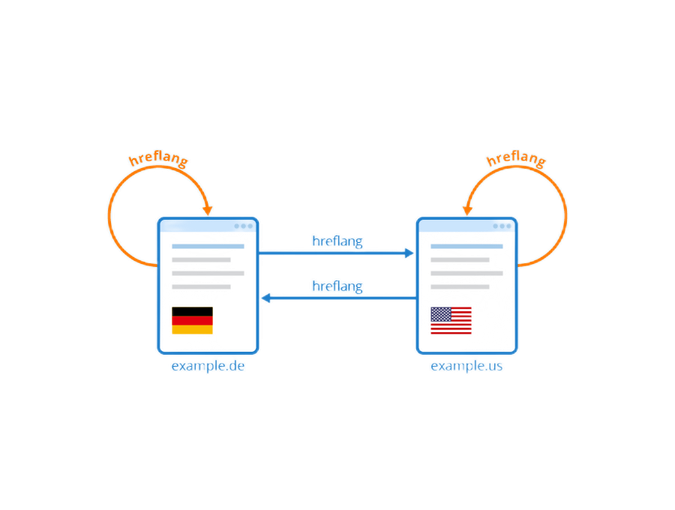
- Hreflang tags - implement them to signal the right language version to search engines
- URL structure - organize URLs consistently across language versions
- Localized content - go beyond translation and adapt for cultural specificities
- Local backlinks - build links from sites in the target language
- Images - translate alt attributes and captions
5. Forgetting to translate dynamic content
Dynamic content is often overlooked when translating a PrestaShop site, creating an inconsistent and potentially frustrating user experience.
An untranslated error message can confuse users and prevent them from solving problems, potentially leading to abandonment of the visit or purchase.
Every step of the cart and order process must be perfectly translated - from shipping options to payment methods to confirmations - to reassure the buyer and facilitate order completion.
- Error and form validation messages
- Promotional pop-ups and stock notifications
- Product filters and sorting options
- Form field placeholders
- Confirmation pages and thank-you messages
6. Not translating images
When we talk about image translation, it's not just about modifying visible text on visuals. It also encompasses adapting textual elements integrated into images and optimizing alt attributes.
Promotional banners are particularly important. If your homepage displays a banner with French text for English-speaking customers, you lose a valuable opportunity to engage them upon arrival.
In some cases, it may be wise to choose different visuals for each market to better reflect local cultural preferences.
- Promotional banners with embedded text
- Labels and descriptions on product images
- Alt and title attributes for all images
- Culturally adapted visuals per market
7. Not displaying the right currencies
Displaying prices in local currency is much more than a convenience - it's a crucial element of the shopping experience and your conversion strategy.
When a customer sees prices in a foreign currency, they must make mental conversions - a source of frustration and uncertainty. This additional friction can significantly reduce your conversion rates.
Your PrestaShop site should detect the visitor's location and automatically display prices in the appropriate currency. Make sure currency conversion is accurate and updated regularly.
- Enable automatic currency detection based on location
- Update exchange rates daily
- Adapt shipping costs and taxes to the displayed currency
- Show discounts and promotions in local currency
8. Not offering local payments
Not offering familiar payment options in each market can seriously hinder your sales. Each country has its own online payment habits.
For example, in Germany many prefer direct bank transfer or Sofort. In the Netherlands, iDEAL is essential. In China, Alipay and WeChat Pay dominate. A customer who doesn't find their usual payment method may abandon their purchase.
Offering local payment methods strengthens your store's credibility and can significantly increase trust and brand loyalty.
- Germany: Sofort, SEPA transfer, Klarna
- Netherlands: iDEAL
- Belgium: Bancontact
- China: Alipay, WeChat Pay
- Global: PayPal, Apple Pay, Google Pay
9. Ignoring the translation of customer reviews and FAQ
The translation of customer reviews and FAQ is often forgotten during PrestaShop site internationalization. Yet, they play a crucial role in purchase decisions and building customer confidence.
A customer visiting the English version of your site cannot fully benefit from experience feedback if it's only in French. The FAQ section is often the first place customers look for answers - if unavailable in their language, it can lead to purchase abandonment.
For the FAQ, consider creating market-specific versions rather than simply translating the original.
- Translate customer reviews or prioritize reviews from local customers
- Adapt the FAQ to questions specific to each market
- Offer customer support in the local language
- Include testimonials from customers in the same country
10. Forgetting to translate product attributes and characteristics
The translation of product attributes and characteristics is generally underestimated. These elements are essential for helping customers make informed purchase decisions.
For example, a customer confronted with clothing sizes in American notation (S, M, L) without metric equivalence could be disoriented and give up their purchase.
Don't forget search and navigation filters. If your translated attributes don't match filtering options, customers will have trouble finding products, leading to frustration and missed sales.
- Sizes and units per local standards (cm vs inches, kg vs pounds)
- Colors and customization options
- Technical characteristics with local terminology
- Navigation filters aligned with translated attributes
Reversia, the solution you need to translate your PrestaShop!
Internationalizing a PrestaShop store is a complex process where every detail counts.
With Reversia, you have a complete solution that addresses each of these potential errors. By choosing Reversia, you ensure successful international expansion and optimal customer experience across all your target markets.